¶ Customer Account
On the Top Right Section of the screen, there is one Avatar Icon with a down arrow option that will have the following modules available.
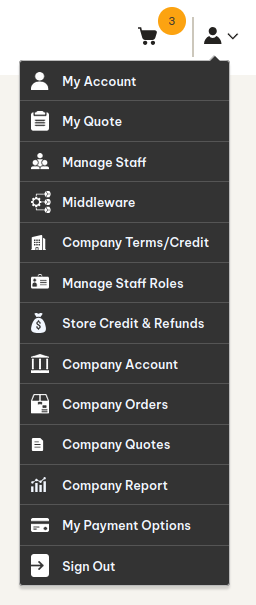
¶ My Account
My Account Sub Menu will open a dedicated page to allow dealers to Edit their First name, Last name, Email Address, Password, Billing and Shipping Addresses and Manage More Addresses.
.png)
¶ Kitchen365 Client
This section is for Kitchen365 Client,
- Here will be two types of users, Company Admin and Staff Member, and both will act as customers in the Magento account.
- Company Admin will have rights to add, view, delete, and update the staff members under the company from here.
- Other than Company Admin, staff members will have only view access of other staff members configured under the company, but they won’t be able to manage (Edit/Delete/Add) staff.
¶ Manage Staff (For Company Admin)
- Here, the company admin can view all the staff tagged under the company and can manage accordingly.
- There will be two types of users, Company Admin and Staff Member, and both will act as customers in the Magento account.
- Company Admin will have rights to add, view, delete, and update the staff members under the company from here.
- Other than Company Admin, staff members will have only view access of other staff members configured under the company, but they won’t be able to manage (Edit/Delete/Add) staff.
.png)
¶ Company Account
From here, company admin/staff can view the below company information:
- Company Information
- Company ID
- Company Name
- Company’s Email Address
- Company Legal Address
- Contacts
- Company Administrator
- Admin Name
- Admin Email
Only the Company admin can upload the Company Logo from here as well, which can be used on the Marked-up Quotes PDF.
.png)
¶ Sign Out
Allow Users to Log Out from The Dealer Portal.